my arduino safe

Everyone loves a good safe. Ok, maybe every security person loves a good safe. Ok maybe it’s just me.

The problem with safes, is trust. You just don’t know if whoever made it, or whoever you bought it from, has a spare key, or has modified the hardware to grant them easy access at a later date.

To quote the late George Carlin, “these are the things I think about when I’m sitting alone at home and the TV is broken”.

I have a safe, it’s a very nice safe. I deliberately got an electronic one with no backup key. So if my house is doused with electromagnetic radiation, I might have some problems getting stuff out of it, but to be honest, I think that’s the least of my problems at that point.

I decided I wanted to re-engineer the electronic locking mechanism, so I could be 100% sure that any manufacturer errors in either the hardware or the firmware wouldn’t affect me. And I trust my own source code than code written by anyone else, unless that code is open source and has been heavily peer-reviewed.

So, I decided I wanted to use an Arduino at this point, largely because the only microcontrollers I have are Arduinos and Raspberry Pis, and because a Raspberry Pi would be overkill here, and also because I have a number of Arduinos knocking about doing not a lot, I decided to use an Arduino.

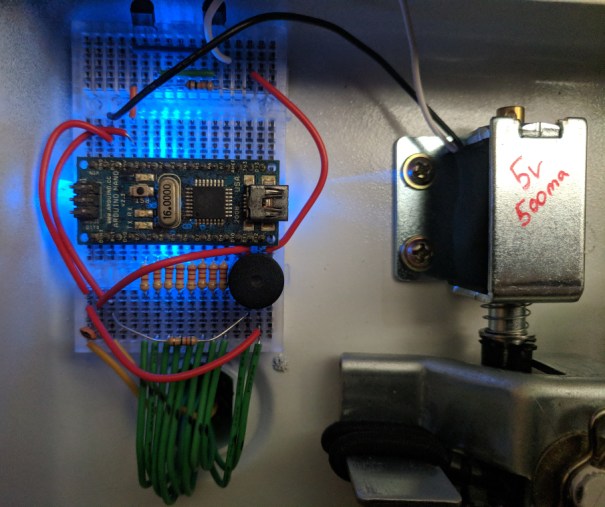
An Arduino Nano, sporting an Atmel ATmega168 processor, to be precise.

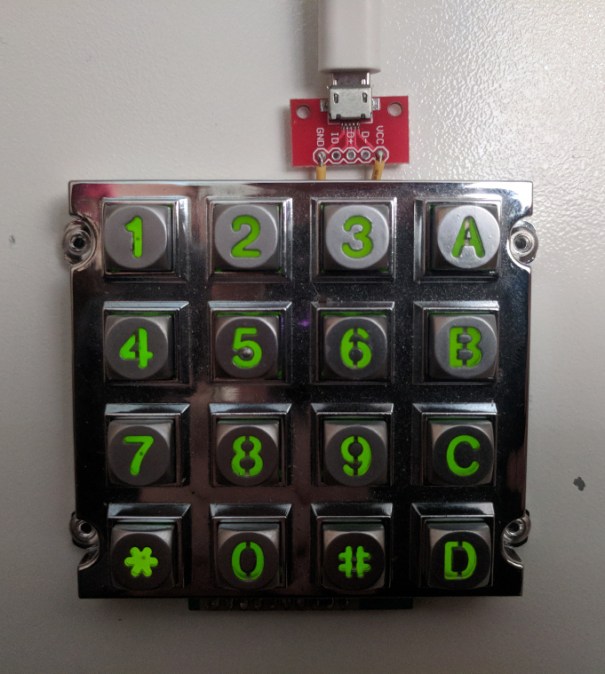
So I took the safe door off (really easily in fact, which is a nice feature of this safe) and I removed the existing I/O parts, including the keypad. I’ve had a vandal-resistant keypad that I got many years ago really cheaply that I’ve been looking to use for ages.

I soldered on the wires, fed them through the wire-hole, then marked out where the keypad would be mounted to the safe, and drilled some holes so it could be riveted in place. Didn’t want to use bolts as this is a fire safe, which means it is very thick, being largely filled with insulation. Rivets are a clean solution here.

Passed the wires through, and stuck a couple of breadboards to the inside of the safe using sticky pads. Incidentally, the breadboards came with sticky-pad backings, but they were a few years old and had lost all of their sticky, even having been covered up the whole time.

Next step, snip the wires to the solenoid (this provides the locking mechanism, preventing the bolts being withdrawn), strip the wires a little, and plug these in to the breadboard. I guessed the solenoid worked on 5v due to the size of the battery pack in the safe, but I also needed to measure the current drawn by the solenoid, so I would know what kind of power is required. Arduino digital outputs have a max draw of 40ma at 5v, so I’d guessed the solenoid would need to be powered more directly from the supply. Turns out the solenoid draws about 500ma at 5v, which is a happy coincidence for my plan to use a USB power supply.

Because I didn’t want to put batteries on the front or back of the safe, I instead stuck a micro-usb adapter on the front, from a pack of them I bought a while ago. I also fed the wires for this through the wire-hole.

After I’d put some wiring in, I decided to add a beeper, this my alternative to having a visual output; I needed some user feedback to indicate the safe electronics are alive and keypresses are being registered.
It also means I can play a bad noise when the code is wrong, and a good noise when it isn’t. I added a tiny capacitor to the speaker circuit just to take the tiniest corner-edge off the square-wave speaker noise, but is generally not required.

Next step, set up a transistor ‘darlington pair’ to activate the solenoid on demand.

After that, the code.

Keeping it simple, I decided not to program in a ‘pin change’ option, or ‘timeout’ for multiple failed attempts, or any other wizardry. The reason being, that I can just set any pin code I like in my source code. The pin in the source code on GitHub is not the one I programmed my safe with. #notAnIdiot.

With this code, I can easily set any pin code between zero and 24 digits, using chars 0-9 A-D. Because I don’t like arbitrary restrictions.

Pressing # submits the pin you just entered, and * resets the input. That’s it.

It also makes a beep when you press a button, it plays an angry sound when you get the pin wrong, and plays a nice C-Scale when it is unlocked.

You may also notice the small bungee cord at the bottom of the image, which is another little customisation, to prevent the bolt being left in the unlocked position. No accidents. Job done.

Source code available here.
password generator progressive-web-app


Back in 2015 I wrote a javascript-based password generator that I turned into a drag-and-droppable bookmarklet, which is a tool that I still use today.

However, as we move forward I found myself signing up for more and more accounts using my mobile device, which doesn’t have support for bookmarklets in the same way that a desktop does.

I also got fed up with having to sign into my password manager on my mobile every time I wanted to generate a new password.

So, after seeing a talk at Brighton PHP on progressive web-apps by Rowan Merewood, I decided to create a new password generator, specifically for mobile devices.

Check it out here. Source code available here.

Check out my original post from 2015 here.

Here is the original bookmarklet, drag it into your bookmarks to use it: [PwGen].

See the PwGen app on securityheaders.io.

Screenshot from PwGen on a mobile device

phones: don’t be complacent with your trust

We trust our phones to connect us to the world, and they allow us to prove our identity.
They are an authentication factor in themselves – proving we have the phone, is one measure of proving we are the owner of an account (via Email, SMS, Google Authenticator, etc).
Proving we can unlock the phone is itself another measure. (Mostly just to prove we didn’t recently steal the phone.)

So why do so many of us who also use our phones for work, agree to trust our employers with complete control over our phones?

I recently wanted to access my work email on my phone, so I installed the email app, and it told me I must have an administrator allow the connection.
So I contacted my friendly local sysadmin, and they said:

You need to install the policy tool on your phone before we can allow you to access work email on your phone.

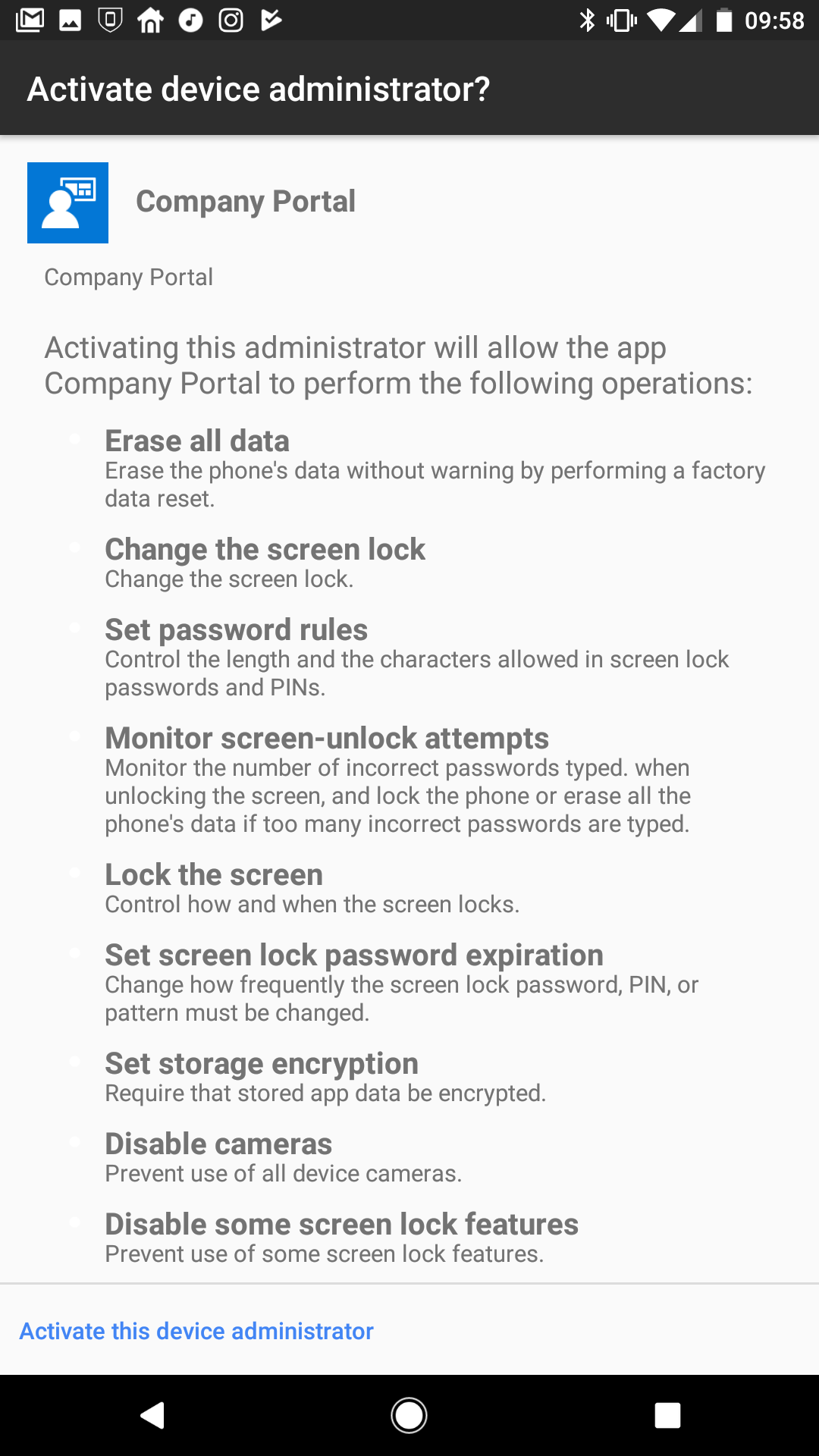
Fine. So let’s look at the permissions this “policy” tool is requesting:


Notably, the app wants these permissions:

  • Erase all data on the phone by performing a factory reset.
  • Change the screen lock.
  • Lock the screen.
  • Enforce storage encryption.

I understand these requirements from a security perspective; they are all administrative functions I would want to have control over, if I owned the phone – which I do. The problem is that the company who I work for does not own my phone. I will never trust them to the same degree that I trust myself.

When I spoke to my colleagues about this, they all said the same thing to me:

But the company will never actually _use_ any of these permissions. – They just want to be able to delete your email from your phone if it’s lost or stolen.

This completely misses the point.

I refused to place my trust in this app for two reasons:

  1. Apps should not be granted more permissions than they need to fulfil their purpose.
    If I agree to these permissions, then it has the power to use them, regardless of any good intentions.
  2. Whether I trust the SysAdmins of my company is irrelevant.
    If a SysAdmin in my company can control my phone – then I’m also entrusting this control to a string of black-box processes and procedures that I have no control over.
    I treat my phone security very seriously – *Nobody else* has the same motives to protect my phone, as I do.

If my company gets hacked – or if any one of the SysAdmin’s accounts gets hacked (and there are probably multiple Sysadmins that have the same access to control my phone) – then a malicious actor now has the ability to lock out my phone, or wipe it with no warning.

This may have the following side-effects:

  • Loss of personal files/photos stored on the device (assuming they aren’t all backed up to the cloud somewhere)
  • Loss of 2-factor login codes (because you don’t have a U2F device)
  • Loss of 2-factor backup codes (unless you keep them stored somewhere safe, and not in a text file on your phone)
  • Loss of other account passwords that you keep in an encrypted text file that you keep on the encrypted SD card in your phone (which isn’t in the cloud, for “security”…)
  • Inability to contact anyone (because you don’t actually remember anyones phone number anymore)
  • Inability to buy things (because you rely on Apply|Android Pay and no longer carry cash or cards)
  • Inability to use public transport (because you use an App for that)
  • Inability to control your house heating/lighting/door-locks (because you can’t get enough of those IoT devices)

But these issues aren’t limited to you. This policy is something that everyone in the company who wants access to their email on their phone, has to agree with and accept.

So if I’m a hacker and I’ve compromised just one SysAdmin account – I have the ability to wipe the phone of everyone in the company who has placed their trust in this app.

Does this include the CEO or board of directors?
Does this include all of the security staff?

Desired Outcomes

A malicious actor might choose to disable these devices for the following reasons:

  • To destabilise a company during a critical period of business, causing financial harm.
  • As part of a campaign to cause as much damage to the company as possible.
  • To inhibit security personnel from countering the actions of the malicious actor.
  • To restrict the short-term management of company stocks and shares.

General Motives

  • Individual victimisation.
  • Retribution against the company.
  • Competitor motivated or financed.
  • Foreign government de-stabilisation.

Victim / Target

The intended victim in this attack can vary a lot. As a user, I might intentionally be the only victim in a directed attack, but I could also just be one of billions of victims.

  • Single targeted user.
  • A group of users within a company who share a common function. (eg. Security Personnel)
  • The company itself (All users of the app in the company)
  • All users of the app (If the app or app company is targeted)
  • All users in a specific country (In a state-sponsored attack on a foreign government, as part of a de-stabilisation process)

Mitigation

  • Any app you require your users to install on their devices, should only have the permissions required to serve its purpose.
  • The ability to perform actions on users’ personal devices must be restricted to those who absolutely need it.
  • Multiple SysAdmins should be required to act as a “group action” to carry out a non-reversible process such as ‘wiping a device’.

Summary

As a company, we need to be less cavalier about what we ask our users to trust us with.

As an employee, we need to be more protective of our own devices, our data, and our privacy.

As system designers, we need to allow for multi-admin safeguards, to ensure any action that results in any action against a user’s device can only be carried out as the collective actions of an authorised group of administrators.

As system engineers, we need to ensure any actions that are carried out are recorded and audited, so that misuse of the system can be identified, reported, and investigated thoroughly.