it’s the little things

When in a rush to deploy new applications, people rarely consider the impact of working on additional little features. I’m not talking about fixing bugs or highlighting browser incompatibilities, I’m talking about little additional extras that normal people dont always notice, but technically savvy people will.

It’s the little things in an application that make the difference between being quite good, and being brilliant.


In an interactive web application, consider adding context menus to interface components. Being able to right-click on something and perform an action on it that would otherwise require you to go to a new page to perform the same action, is a little thing, but a useful, time saving, bandwidth reducing addition to your application.


If you have paginated results of things that is limited to a specific number, say 20, why not check first if the actual list size is only marginally over that number before sending back only 20 items?
If you have 20 items on page 1, and there are 2 pages, the user may be disappointed when they click on the ‘next page’ button when only 1 more result comes back.
If there are only marginally more results than the pagination is limited to, just show them all and hide the pagination features.


Make use of HTML5 form features – use the new types!
Instead of using
you should be using .
On mobile devices, this restricts the available keys on the displayed keyboard to only those used in phone numbers, adding an extra layer of validation, and also making the user feel like they might actually be using a modern website.
There are more in-depth validation options you can use here, there is a great article here: Making Forms Fabulous with HTML5.


Make sure any part of your site that submits personal information, like your name, email address, and especially login details, always submit this information using HTTPS.
Actually this isn’t a little thing, it is quite a big thing, but I mention it here anyway because it’s good to remind developers as often as possible that they really should be doing this.


Make sure your site has a `favicon` ๐Ÿ™‚ Remember that any user that opens more than a few tabs may only be able to see the favicons and not the page names in their tabs list. A picture paints a thousand words. Adding this small image creates a strong bond between the colours and shapes of the image, and your website. This helps users identify which website is yours in their tabs list, and hopefully in their list of bookmarks too.


If you have several simple pages on your site that users visit regularly, consider combining them into a single page, even if this means having another page, it might just cause a reduction in unnecessary traffic.
Maybe show a portion of each page instead, so users can see part of the pages at a glance, and can still click through to them to see more detail.


Use hover/popup/help text. If you have an abbreviation on a page, and your user doesn’t know what it means, they might feel a little frustrated that you are expecting them to know already. Don’t force them to Google it – use the `<abbr>` tag. When it isn’t an abbreviation but a link displayed only as an icon, then make sure you use the `title` attribute of the image – otherwise your users may not even know what the button does!
In fact it is a generally recommended accessibility rule anyway – those with impaired visibility might have other less common mechanisms to interpret your website, and these devices can’t be expected to describe what your icons look like if you haven’t bothered to give them any description.


Happy tinkering ๐Ÿ™‚

computers don’t read comments

This is a draft specification for a self-defining database schema using a row-oriented database, such as MySQL. I reserve the right to update this document at any time ๐Ÿ™‚

This post is basically a brain dump to try to nail down the naming convention which should be used in databases to make the names easily parseable and readable in a processing environment, with as little configuration, and as little operational limitation as possible. I plan to update this document as I use this specification, as I fully expect it to evolve over time.

table/entity naming convention

  • Table names must match exactly the class object names in our database. All entity names are suffixed with ‘Entity’, as are our table names.
  • Table names must be less than 32 chars for readability, but are limited to 64 chars in length, including the length of `Entity` – so bear this in mind when naming your entities.
  • Table names must begin with a capital letter, not a number, and contain only the following letters `[A-Za-z0-9]`.
  • Special characters and spaces are prohibited.
abcdefghijklmnopqrstuvwxyzabcdef
#                              ^ 32 chars (quite long)         v 64 chars (silly)
abcdefghijklmnopqrstuvwxyzabcdefghijklmnopqrstuvwxyzabcdefghijkl

Example valid table names:

`FooEntity`, `Bar123Entity`, `ALongerNameEntity`, `ANameWithAnAcronymABCDEntity`

We use a common suffix on our entity names and tables for the following reasons:

  • to easily map our tables to entities
  • to easily map our entities to tables
  • to prevent using reserved names in PHP
  • to prevent using reserved names in MySQL
  • to easily identify when we are working with an Entity in our application

field/property naming convention

Field names must contain all the description required to properly submit or read the data from the database, or to determine the proper relationship with another table.

`<prefix><CamelCaseName>`

prefix:
`e` = enum (always stored as an int in the database, never use database `enum` type)
`s` = string (varchar, longtext, shorttext, mediumtext, etc.)
`i` = int (tinyint, smallint, mediumint, int, bigint, etc.)
`f` = float (float, double, single, etc.)
`b` = bool (`tinyint(1)` = `1` or `0`)
`o` = object (stored as an int in the database, contains ID of the foreign key)
`r` = raw binary (usually a blob)
`d` = datetime (should be used for date, datetime, time, and timestamp types)
`x` = internal, reserved, used for mapping

Prefixes are compulsory – the length/format is never checked, assumed the database will accept any length output by the system, but should fail gracefully when exceeded.
Case sensitive columns names – the CamelCaseName is just a name, has no processed meaning.

One exception to this case – the `id` field is always present in every table, and is used to uniquely reference each row. This is also recorded as the `id` field in the entity class.

If the entity is referred to by other entities and you need this relationship in reverse to be automatically populated into an array, then the object type needs to be an `array` within the entity definition, and an `int` within the table definition, also following the `object` naming convention above.

<?php
public class OrderEntity
{
    const XDBMAP_OPERSON = 'PersonEntity';

    /** @var PersonEntity */
    public $oPerson;
}
public class PersonEntity
{
    const XDBMAP_OHOUSEHOLDENTITY = 'HouseholdEntity';
    const XDBMAP_OMANAGER = 'PersonEntity';
    const XDBMAP_OSTAFF = '[PersonEntity.oManager]';

    /** @var HouseholdEntity */
    public $oHousehold;

    /** @var PersonEntity */
    public $oManager;

    /** @var PersonEntity */
    public $oStaff = [];
}
public class HouseholdEntity
{
    const XDBMAP_OOCCUPANTS = '[PersonEntity.oHousehold]';

    /** @var PersonEntity[] */
    public $oOccupants = [];
}

enums

ENUMS within the database are prohibited. They unnecessarily complicate matters, especially when it comes to modifying the enum values.

Indexed lookups, referential integrity, etc. may be used – the application has no awareness of them.

Entities within the database that are defined from a CONST value held in the Entity class definition should be defined with the prefix `i`, `s`, `f` or `b` as shown above, and not linked to a foreign table. The principle behind this is that list entities in the database should only be present when adding to or removing from the list affects the application without having to modify the code for the change to take effect. This also stands up to database normalisation rules – the data should not be duplicated, i.e. it should not be stored as a CONST value AND be defined in the database.

<?php
public class FooEntity
{
    const
        ESERVICETYPE_FOO = 1,
        ESERVICETYPE_BAR = 2,
        ESERVICETYPE_FAR = 3,

    const
        ESERVICETYPE__1 = 'I am Foo',
        ESERVICETYPE__2 = 'We are Bar',
        ESERVICETYPE__3 = 'You are Far',

    /** @var int */
    public $id;

    /** @var int */
    public $eServiceType = self::ISERVICETYPE_FOO;
}

The example above describes a field in the database being represented as an integer – there is no functionality to be gained from having the field name stored in a separate table in the database, if modifying any of the 3 values above would have no effect without a code change.
Note the naming convention here – the const names above exactly match the variable name, in uppercase only. The underscore separates the name from the machine value, and the const is defined in a block to indicate to the developer that these options apply to the same field.
Note the additional const names – these names are for display purposes only, and describe the machine value stored in the field. So the internal value of FooEntity::FOO is 1, and the human-readable version of that is ‘I am Foo’, used for display purposes only, and never stored – this value might be subject to change, based on your application.
If more complex enums are required, such as the storage of string-value enums, then a separate table and object class should be used instead. The above configuration is intended to suit most use cases, but will not suit all.

Consts with a double-underscore separating the name from the value are used for display purposes, e.g. `ESERVICETYPE__3` is a const field that contains the display value for `ESERVICETYPE_FAR`, which has a const value of 3. This enables easy lookup of the display value given the stored value. Now you are starting to see the importance of this field always being numeric.

Furthermore, the const display fields are not compulsory, but their existence will not be checked prior to their usage – so if you do use the fields for display purposes, make sure you have the const values properly configured. EAFP – It is easier to ask for forgiveness than permission.

nulls

Whether any field in the table can be stored as `null` is entirely down to you – the application will not care, and will fail with a handled error if a null value is attempted to be stored in a non-null field.

relationships

If the field type is an object (prefixed with `o`), then the field name should be suffixed with the name of the database table to which it refers, separated with an underscore.

default values

Default values should be specified in the entity class as defaults for the class properties, in the example above `self::ISERVICETYPE_FOO` is the default value for `$eServiceType`.
If default values are required that are not able to be specified in the parameters, like `new DateTime()`, then these should be set in the entity `__construct()` method.

linux tips: screen

When you’re working in a remote terminal environment, being able to resume a session can be an invaluable tool – especially when the connection isn’t stable.

When connecting to a UNIX-based environment (like the many varieties of Linux, or OSX) there is a handy utility called `screen` that effectively allows you to run tabbed terminal consoles within a single terminal console. This has many benefits, not just the ability to resume the connection if the connection drops.

adding a status bar

The first thing to do when starting any new screen session, is to add a config file. This file changes the default look and feel of screen, which isn’t very intuitive if you’re just learning how to use it.
I’m going to use `vim` to write my config file, and I’m going to use a configuration that I pilfered from somewhere on the internet a while ago:

# ~/.screenrc
termcapinfo xterm* ti@:te@
startup_message off
vbell off
autodetach on
altscreen on
shelltitle "$ |bash"
defscrollback 100000
defutf8 on
nonblock on
msgwait 0
hardstatus alwayslastline "%{b kw}%H %{r}%1` %{w}| %{y}%Y-%m-%d %c %{w}| %{g}%l %{w}| %{-b kw}%u %-Lw%{= rW}%50> %n%f %t %{-}%+Lw%
# (This fixes the "Aborted because of window size change" konsole symptoms found
#  in bug #134198)
termcapinfo xterm* 'is=E[rE[mE[2JE[HE[?7hE[?1;4;6l'
# (you may have to change the 'xterm' value to match your $TERM value)

The most useful lines in this config file are the last two – they add the status bar to the screen window, which contains the list of open terminal tabs – which is verrry useful and I don’t know why this isn’t the default setup.
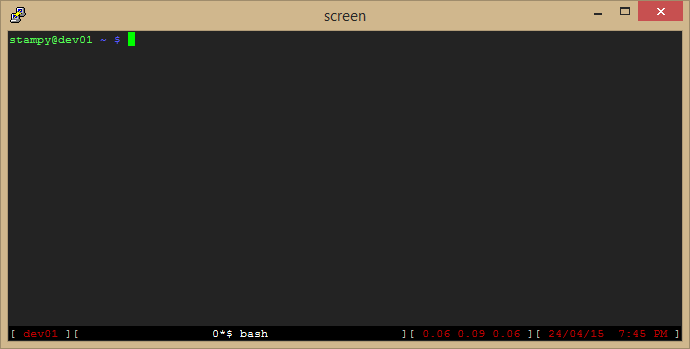
In the configuration shown above, the status bar contains the hostname on the left, the system load on the near right, and the server date and time on the far right, and your list of open terminal tabs in the middle.
Save this file into your home directory (usually `/home/yourusername/.screenrc`) and start start screen by running the command `screen`, and your window should look similar to this:

screen01

tab navigation

Press `ctrl-a c` to open a new tab
Press `ctrl-a shift-a`, change the name, and press `return` to save.
Press `ctrl-a-a` to switch between your most recent 2 tabs, or use `ctrl-a [num]` to switch to the tab numbered `[num]`, i.e. `ctrl-a 1` to switch to tab 1, `ctrl-a 2` for tab 2, etc.

detach and re-attach

I’ve pointed out that I believe the most useful feature of screen is the ability to detach and re-attach to screen sessions in the event of being disconnected from the server – so how do you go about actually doing that?
When you have connected to the server, to create a new screen session you type `screen` – but to re-attach to an existing disconnected screen session, type `screen -R`.
Sometimes, if you have disconnected very recently, the old screen session might still be attached to your old session! In order to tell screen you want to resume an existing screen session, and forecfully disconnect it from any connected session, use `screen -dR`. This does mean that if you have superuser privileges on the system to which you are connecting, anyone else who can assume control of your account can also take control of your screen session!

To detach your current screen session, press `ctrl-a d`.

locking your screen session

While in a screen session, press `ctrl-a x` to lock your session. This protects your open terminal sessions from being taken over by someone who might have access to your account. This won’t protect you from much, but it does add an extra layer of security that can help to delay or prevent security breaches.

This becomes a more useful feature when you realise that as a superuser, you can have multiple terminals open in screen, each one connected to a different server, each one potentially logged in as a more privileged user than the original screen session itself – so if a hacker manages to acquire the user’s username and password, they would be able to log in and resume all of these already logged in sessions with little more than a single command.

… so Lock Your Terminal!

scrolling history

When in cursor mode, you can search for patterns, and highlight and copy text too.

  • Press `ctrl-a Esc` to enter interactive cursor mode
  • Use the cursor keys (`up`, `down`, `left`, `right`, `PgUp`, `PgDn`) to navigate back in the history of the current screen terminal
  • Press `Esc` at any time to exit cursor mode and return to normal interactive mode
  • Press `Return` to start highlighting text at the position of the cursor
  • Use the cursor keys to select desired text
  • Press `Return` again to copy the selected text into the screen paste buffer – This will also exit cursor mode and return to interactive mode
  • To paste the text you’ve just copied, press `ctrl-a ]` when you’re in a suitable location. You can use this technique to copy and paste chunks of text or commands between console windows in the same screen session.

When in cursor mode, you can also search forwards and backwards using `/` and `?` respectively, just like in `vim` – to search “up” the screen from the cursor location, enter `?`, type your search string, and press `return`.
To find the next or the previous piece of text that matches your entered search, press `/` or `?` again and just press `return`.

further help

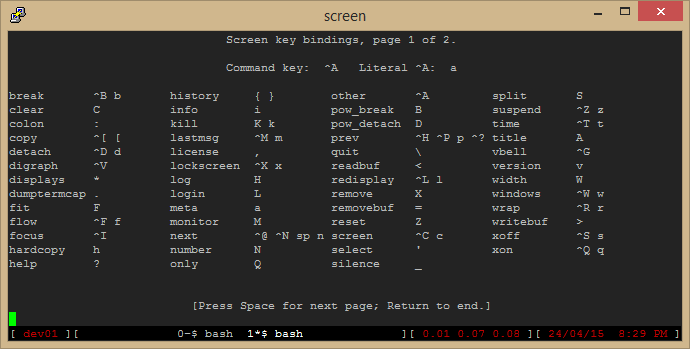
To access the help menu in screen, press `ctrl-a ?` and you will be presented with a list of further commands you can try out, which aren’t described quite as concisely as they are on this page, but they are a useful cheat-sheet, once you learn how to read the syntax.

screen03

bonus content

You might have noticed that my terminal prompt has also been customised – the code for this is added to the end of the file found in `/home/[yourusername]/.bashrc` – add the following code to the end of your `.bashrc` file:

# ~/.bashrc
PS1="$(if [[ ${EUID} == 0 ]]; then echo '[33[01;31m]h'; else echo '[33[01;32m]u@h'; fi)[33[01;34m] w $([[ $? != 0 ]] && echo "[33[01;31m]:([33[01;34m] ")\$[33[00m] "